RAG is Dead, Long Live RAG: Building Your Own Vector Database Pipeline

After watching countless companies burn through budgets on overpriced enterprise RAG solutions, I decided to build something better.
What started as a high-performance GitHub-to-Qdrant ingestion pipeline has now evolved into a complete open-source RAG operations toolkit: multi-repository ingestion, semantic chunking, PDF/OCR processing, deterministic incremental sync, semantic retrieval, AI-generated answers with sources, Qdrant 1.18 configuration support, benchmarking, diagnostics, safe configuration editing, and an interactive terminal UI.
From GitHub repositories to searchable and askable vector databases-supporting markdown, PDFs, code files, configuration docs, and 150+ file types-the project is now much more than a sync script. With v0.5.0, it provides a practical foundation for building, operating, validating, and interacting with your own documentation knowledge base.
The Vendor Lock-in Trap
Recently, I've been watching companies fall into the same expensive trap over and over again. They rush toward costly enterprise RAG solutions from big vendors, risking vendor lock-in while driving their costs through the roof.
Meanwhile, there is a better approach sitting right under their noses: building their own automated documentation processing pipeline using vector databases.
RAG is dead, long live RAG! 🚀
But here's the thing-it doesn't have to be this way. What if all your documentation from GitHub repositories, different versions, different branches, PDFs, code files, configuration docs, and internal knowledge sources could be automatically integrated into a central knowledge base?
And not only searched, but also queried conversationally with AI-generated answers grounded in your own sources.
It is not just possible. It is now practical.
The Problem with Current Solutions
When I look at the current RAG landscape, I see four major issues:
- Expensive Enterprise Solutions: Companies are paying premium prices for solutions that could often be built in-house.
- Vendor Lock-in: Once you're committed to a platform, switching becomes prohibitively expensive.
- Manual Documentation Management: Teams waste countless hours keeping documentation systems in sync.
- Poor Operational Visibility: Many systems ingest data, but give little visibility into retrieval quality, broken indexes, incompatible embeddings, stale collections, or missing metadata.
I decided to solve this problem by building my own pipeline.
The result is an open-source system that transforms GitHub repositories into searchable vector databases-and, with the current version, into an interactive knowledge interface.
The Solution: Automated Documentation Processing
Imagine this scenario: all your documentation from GitHub repositories gets automatically integrated into a central knowledge base. Whether you're using LibreChat, LangDock, MeinGPT, VS Code, Claude Desktop, a custom AI agent, or the built-in terminal UI-your documentation becomes centrally available.
No more endless searching. No more manually copying docs. No more stale knowledge bases. 🔍
The project now provides:
- 💰 Cost Savings: Automation saves money and reduces manual effort. The system keeps documentation up to date.
- 🔓 Vendor Lock-in Avoidance: Keep control over your data, models, infrastructure, and retrieval strategy.
- 🎯 Centralized Access: Whether it is a chat application, IDE, desktop tool, CLI, or terminal UI-your documentation becomes available everywhere.
- ⚡ Performance: 5-15x faster processing through optimized deduplication and batching.
- 🌐 Flexibility: Choose cloud APIs, local models, or hybrid approaches.
- 🧠 AI Answers: Ask natural-language questions and receive grounded answers with sources.
- 📊 Quality Checks: Benchmark retrieval quality and diagnose index problems before they become production issues.
- 🛡️ Operational Safety: Detect incompatible collections before they silently damage retrieval quality.
How It Works
The system is built around a straightforward but powerful architecture.
The ingestion pipeline clones repositories, extracts supported files, processes PDFs where needed, chunks content, generates embeddings, removes duplicates, and uploads vectors into Qdrant.
The retrieval layer can then search one collection, a selected collection from a repository list, or all configured collections. The answering layer builds on top of retrieval by sending the best matching context to a configured chat model and returning an answer with sources.
The terminal UI brings this together in one interactive workflow.
Technology Stack
- Python: Core programming language.
- LangChain & LangChain Experimental: Document processing, chunking, and semantic chunking.
- Azure OpenAI / Mistral AI / Sentence Transformers: Flexible embedding providers.
- Mistral AI / Azure OpenAI: Optional answer generation for grounded AI responses.
- Qdrant: Vector database for storing, indexing, and querying vectors.
- Typer + Rich: Modern command-line interface.
- Textual: Interactive terminal UI with fixed panes and slash commands.
- PyMuPDF / PyPDFLoader / Mistral OCR: PDF extraction options.
- GitHub: Source for repository-based documentation.
Quick Start
The project can still be used as a classic script, but it now also supports an installable CLI.
Because v0.5.0 was recreated after the original release, install from the release tag to make sure you get the CLI/TUI version. Also make sure you use Python >=3.10; on macOS, the system python3 may still be Python 3.9.
git clone --branch v0.5.0 https://github.com/maholick/github-qdrant-sync.git
cd github-qdrant-sync

python3.12 -m venv venv
source venv/bin/activate

python -m pip install --upgrade pip
pip install -e .

github-qdrant-sync --version
Expected output:
GithubQdrant-Sync v0.5.0Any Python >=3.10 is fine, for example python3.10, python3.11, python3.12, or python3.13.
Create your configuration:
cp config.yaml.example config.yamlThen edit config.yaml with your Qdrant settings, embedding provider, API keys, and repository settings.
You can still run the original ingestion script:
python github_to_qdrant.py config.yamlOr use the new CLI:
github-qdrant-sync ingest config.yamlSearch your indexed documentation:
github-qdrant-sync query config.yaml --query "How do I configure authentication?"Ask a question and receive an AI-generated answer with sources:
github-qdrant-sync ask config.yaml --question "How do I configure authentication?"Launch the interactive terminal UI:
github-qdrant-syncor:
github-qdrant-sync interactive config.yamlConfiguration Example
The system supports multiple embedding providers and optional answering models.
embedding_provider: mistral_ai

github:
  repository_url: https://github.com/your-org/docs.git
  branch: main
  token: ${GITHUB_TOKEN}

qdrant:
  url: ${QDRANT_URL}
  api_key: ${QDRANT_API_KEY}
  collection_name: documentation
  vector_size: 3072
  distance: Cosine
  vector_name: dense

mistral_ai:
  api_key: ${MISTRAL_API_KEY}
  model: codestral-embed
  dimensions: 3072

answering:
  provider: mistral_ai
  model: mistral-large-2512
  temperature: 0.2
  max_context_chars: 12000
  system_prompt: >
    Answer using only the provided repository context.
    Cite sources when possible.

processing:
  file_mode: all_text
  chunk_size: 1000
  chunk_overlap: 200
  chunking_strategy: semantic
  embedding_batch_size: 50
  batch_delay_seconds: 1
  deduplication_enabled: true
  similarity_threshold: 0.95

pdf_processing:
  enabled: true
  mode: hybrid
This configuration uses Mistral AI for embeddings and answering, Qdrant for vector storage, semantic chunking for better context boundaries, and hybrid PDF extraction.
The New CLI
The installable CLI is one of the biggest improvements in the current version.
Instead of remembering individual Python scripts and arguments, you can use:
github-qdrant-syncThe CLI includes commands for ingestion, retrieval, answering, diagnostics, benchmarking, improvement suggestions, validation, and interactive usage.
Examples:
github-qdrant-sync ingest config.yaml
github-qdrant-sync query config.yaml --query "authentication flow"
github-qdrant-sync ask config.yaml --question "How does SSO work?"
github-qdrant-sync collections config.yaml
github-qdrant-sync doctor config.yaml
github-qdrant-sync benchmark config.yaml --cases eval.yaml
github-qdrant-sync improve config.yaml --cases eval.yaml
github-qdrant-sync validate-config config.yaml
github-qdrant-sync wizard
The legacy script workflow remains available:
python github_to_qdrant.py config.yaml
python rag_retrieval.py config.yaml --query "authentication"
This is important because existing automation does not break, while new users get a modern command experience.
Query vs. Ask
The project now makes an important distinction between retrieval and answering.
query returns matched snippets from Qdrant:
github-qdrant-sync query config.yaml --query "How do I configure authentication?"This is useful when you want to inspect the raw evidence.
ask retrieves relevant chunks and then generates an answer using a configured chat model:
github-qdrant-sync ask config.yaml --question "How do I configure authentication?"This is useful when you want the final answer, grounded in your indexed repository content.
That distinction matters. Many RAG systems hide retrieval behind a chat response. Sometimes that is useful, but sometimes you need to see the actual matching snippets. This project supports both workflows explicitly.
Supported answering providers include:
- Mistral AI
- Azure OpenAI
Interactive Terminal UI
The current version introduces a Textual-based terminal UI.
Launching:
github-qdrant-syncopens an interactive fixed-pane terminal interface with:
- A header showing config, scope, version, and provider state.
- A main output area for answers, search results, diagnostics, or validation output.
- A source table with ranked matches.
- A collections panel.
- A bottom command input with slash commands.
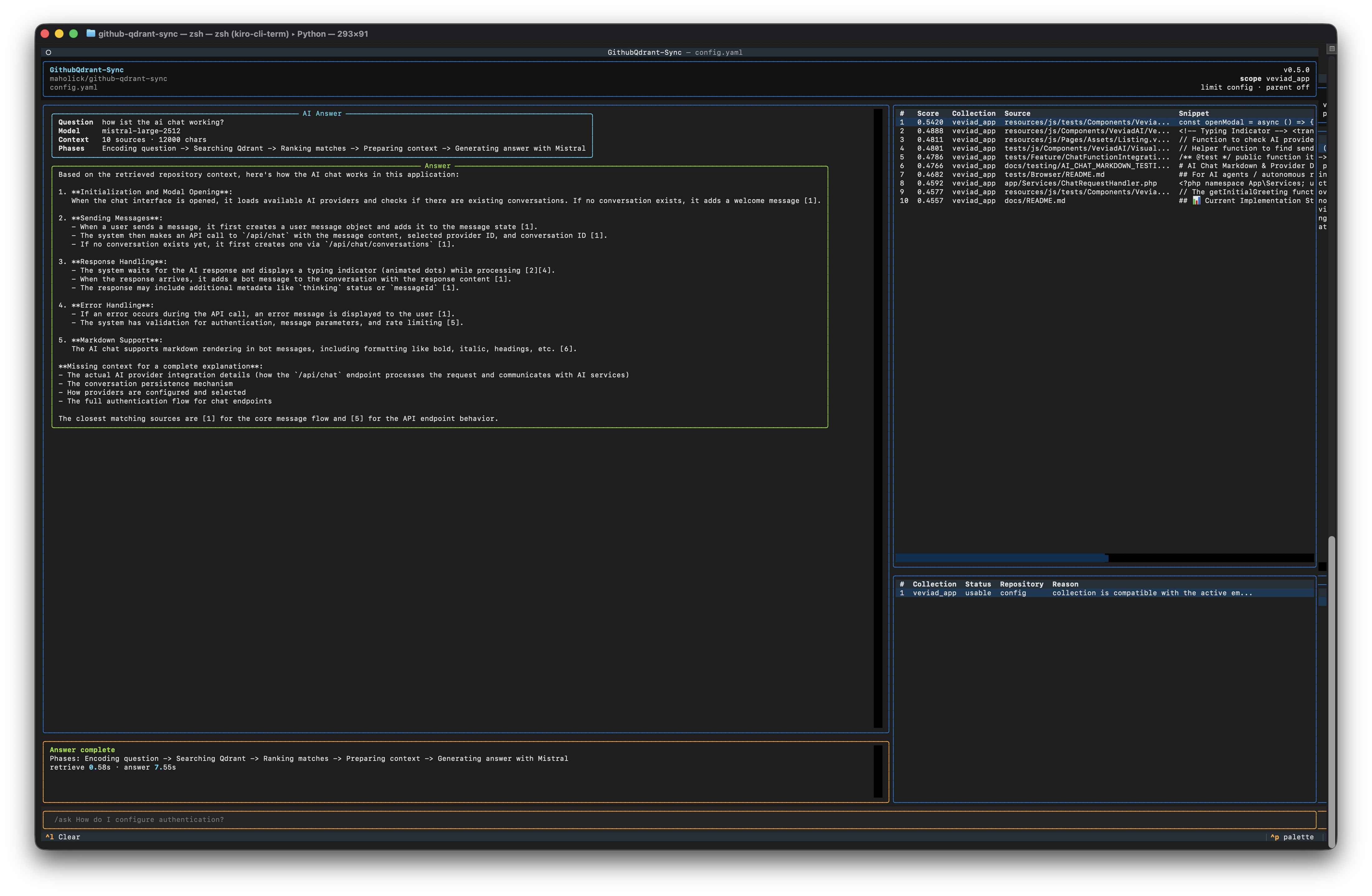
The new Textual-based TUI turns the project from a batch-processing script into an interactive terminal knowledge tool.
Example commands inside the TUI:
/ask How does SSO work?
/search authentication middleware
/scope all
/scope documentation
/collections
/benchmark eval.yaml
/doctor
/config
/validate
/quit
The slash command palette is grouped into categories:
- Search & Ask
- Collections
- Config
- Quality
- Ingest
- Session
This turns the project from a pure batch-processing script into an actual terminal knowledge tool.
Multi-Repository Processing
One of the most powerful capabilities is multi-repository processing.
Instead of running the script once per repository, you can define all repositories in a single file:
repositories:
  - url: https://github.com/langchain-ai/langchain.git
    branch: main
    collection_name: langchain-docs

  - url: https://github.com/openai/openai-python.git
    branch: main
    collection_name: openai-python-docs

  - url: [email protected]:myorg/private-repo.git
    branch: develop
    collection_name: private-docs
Then run:
github-qdrant-sync ingest config.yaml --repo-list repositories.yamlThe important improvement in the current version is that repository lists are no longer only for ingestion. They can also define retrieval scope.
Ask across all listed collections:
github-qdrant-sync ask config.yaml \
  --repo-list repositories.yaml \
  --question "How is authentication configured across these projects?"
Search one specific collection:
github-qdrant-sync query config.yaml \
  --repo-list repositories.yaml \
  --collection openai-python-docs \
  --query "rate limits"
This makes it much easier to build organization-wide documentation knowledge bases.
Collection Compatibility Checks
One of the most important production features is automatic collection compatibility checking.
In real systems, collections may have been created with different embedding providers, dimensions, vector names, or distance metrics. Searching across incompatible collections can silently degrade results.
The CLI now checks this before retrieval.
If a collection was embedded with a different model, it is skipped and shown clearly:
Skipped collection: legacy-docs
Reason: embedded with mistral_ai/codestral-embed, config uses sentence_transformers/all-MiniLM-L6-v2
The default policy is conservative:
- Use compatible collections.
- Warn about unknown metadata if vector settings match.
- Skip incompatible collections.
- Fail only if no usable collections remain.
This is exactly the kind of operational safety RAG systems need in production.
Retrieval Quality: Doctor, Benchmark, Improve
A common problem with RAG systems is that teams only notice retrieval problems after users complain.
That is too late.
The current version introduces a quality workflow:
github-qdrant-sync doctor config.yaml
github-qdrant-sync benchmark config.yaml --cases eval.yaml
github-qdrant-sync improve config.yaml --cases eval.yaml
Doctor
The doctor command checks collection health:
- Collection existence.
- Point count.
- Vector size.
- Distance metric.
- Vector name.
- Payload fields.
- Payload indexes.
- Embedding compatibility.
- Repository-list coverage.
Benchmark
Benchmark cases are defined in YAML:
version: 1
thresholds:
  pass_rate: 0.8
  expected_source_top_k: 5
  min_top_score: 0.4
  min_keyword_coverage: 0.5

cases:
  - id: sso
    query: sso
    collection: documentation
    expected_sources:
      - app/Http/Controllers/Auth/Sso
      - resources/js/Pages/Admin/Integrations
    keywords:
      - sso
      - authentication
This allows you to measure retrieval quality instead of guessing.
Improve
The improve command generates actionable recommendations and can apply safe, non-destructive improvements when explicitly requested.
It does not silently recreate collections, change embedding dimensions, or reingest data. Those are reported as explicit follow-up actions.
Qdrant 1.18 Configuration Support
The project now supports configuration paths for modern Qdrant features introduced around Qdrant 1.18.
This does not mean the project replaces Qdrant's own engine-level capabilities. Instead, it exposes and validates configuration for supported Qdrant features so they can be used consistently from the ingestion pipeline, retrieval path, CLI, and TUI.
TurboQuant Configuration
v0.5.0 adds optional TurboQuant configuration support for Qdrant collections.
qdrant:
  quantization:
    enabled: true
    method: turbo
    bits: bits4
    always_ram: true
    search:
      ignore: false
      rescore: true
      oversampling: 2.0
When enabled, new collections can be created with the configured TurboQuant settings. Search commands can also pass configured quantization search parameters to Qdrant.
This is intentionally opt-in. Changing quantization settings is index-affecting, so existing collections should be updated or recreated intentionally rather than silently changed.
Hybrid Retrieval Configuration
Dense embeddings are excellent, but keyword-style matching still matters-especially for code, configuration keys, class names, function names, and acronyms.
The project now supports optional dense + sparse retrieval configuration:
retrieval:
  mode: hybrid
  fusion: rrf

qdrant:
  vector_name: dense
  sparse_vector:
    enabled: true
    name: sparse
    model: qdrant/bm25
This gives you a more balanced retrieval strategy for technical documentation by combining dense semantic retrieval with sparse keyword-oriented retrieval.
Semantic Chunking & PDF Intelligence
Semantic chunking and PDF processing remain core strengths of the pipeline.
Semantic Chunking
Traditional chunking breaks text at arbitrary character limits. Semantic chunking uses embeddings to identify more natural boundaries.
processing:
  chunking_strategy: semantic
Benefits:
- Better preservation of ideas.
- Less fragmented context.
- Better retrieval quality for conceptual questions.
PDF Processing
The project supports:
- Local mode: PyMuPDF with fallback extraction.
- Cloud mode: Mistral OCR for complex or scanned PDFs.
- Hybrid mode: Local first, cloud when needed.
pdf_processing:
  enabled: true
  mode: hybrid
This allows one pipeline to handle markdown, source code, configuration files, and complex PDF documentation.
Deduplication: The Secret Sauce
The performance gains still come from sophisticated deduplication algorithms.
The system uses a two-stage approach:
- Content Hash Filtering: Instantly removes exact duplicates.
- Semantic Similarity: Uses configurable thresholds to identify near-duplicates.
processing:
  deduplication_enabled: true
  similarity_threshold: 0.95
  chunk_size: 1000
  chunk_overlap: 200
This reduces storage requirements, accelerates queries, and avoids polluting your vector database with redundant chunks.
Embedding Models: Choosing the Right Tool
The system supports multiple embedding providers, each optimized for different use cases:
| Provider | Model | Dimensions | Best For |
|---|---|---|---|
| Azure OpenAI | text-embedding-3-small | 1536 | Cost-effective cloud embeddings |
| Azure OpenAI | text-embedding-3-large | 3072 | High-quality enterprise embeddings |
| Mistral AI | mistral-embed | 1024 | General text |
| Mistral AI | codestral-embed | up to 3072 | Technical documentation and code |
| Sentence Transformers | all-MiniLM-L6-v2 | 384 | Fast local embeddings |
| Sentence Transformers | multilingual-e5-large | 1024 | Multilingual local embeddings |
My Recommendations
- Technical documentation:
codestral-embed - General documentation:
mistral-embedortext-embedding-3-large - Privacy/offline use cases: Sentence Transformers
- Enterprise Azure environments: Azure OpenAI
- Cost-sensitive local workflows: Sentence Transformers
Safe Configuration Editing
The terminal UI also supports safe configuration editing.
Instead of editing raw YAML inside the terminal UI, you can inspect, stage, validate, and save controlled changes:
/config
/get qdrant.collection_name
/set retrieval.top_k 8
/secret qdrant.api_key QDRANT_API_KEY
/changes
/validate
/save-config
/save-config --confirm
Secrets are handled as environment variable placeholders, not raw values.
This is important because configuration is one of the highest-risk areas in AI infrastructure. Accidentally leaking API keys or changing embedding dimensions without realizing the consequences can break production systems.
The TUI therefore warns about index-affecting changes such as:
- Embedding provider.
- Embedding model.
- Vector size.
- Distance metric.
- Vector name.
- Collection name.
- Quantization settings.
The Performance Advantage
Traditional approaches to document processing and deduplication are painfully slow.
Traditional Approach
- O(n²) complexity: each chunk compared to all previous chunks.
- Individual similarity calculations.
- No useful progress reporting.
- Hours for large repositories.
Optimized Approach
- Content hash pre-filtering for exact duplicates.
- Vectorized similarity with batch NumPy operations.
- Semantic chunking for better context boundaries.
- Progress reporting for visibility.
- Memory-aware batching.
- Configurable thresholds for near-duplicate detection.
Real-World Performance Results
| Repository Size | Traditional Approach | Optimized Approach | Speedup |
|---|---|---|---|
| Small (100 files) | 5 minutes | 1 minute | 5x |
| Medium (500 files) | 45 minutes | 5 minutes | 9x |
| Large (1000+ files) | 3+ hours | 15 minutes | 12x+ |
The exact numbers depend on file types, embedding provider, PDF complexity, network latency, and Qdrant configuration. But the overall pattern is clear: optimized ingestion, batching, and deduplication matter.
Production Considerations
Running this in production requires attention to several factors.
Rate Limiting
Different providers have different limits:
- Mistral AI: Usually manageable with modest batching and delays.
- Azure OpenAI: May require more careful rate handling.
- Sentence Transformers: No API limits, but local hardware matters.
The pipeline includes retry and batching logic for cloud providers.
Memory Management
- Batched processing prevents memory overflow.
- Temporary files are cleaned up.
- Embeddings are processed incrementally.
- Deduplication uses optimized NumPy operations.
- Local embedding performance depends on CPU/GPU availability.
Security Best Practices
- Use environment variables for API keys.
- Never commit
config.yamlor.env. - Use dedicated service accounts.
- Keep secrets out of logs and JSON output.
- Validate configuration before ingestion.
- Use compatibility checks before multi-collection retrieval.
Multiple Configuration Workflows
The project supports different configurations for different use cases:
# German documentation with local embeddings
github-qdrant-sync ingest config_multilingual.yaml

# Technical documentation with Mistral AI
github-qdrant-sync ingest config_technical.yaml

# PDF-heavy repositories with OCR support
github-qdrant-sync ingest config_pdf_processing.yaml

# Complete codebase with all file types
github-qdrant-sync ingest config_codebase_complete.yaml

# Ask across multiple repositories
github-qdrant-sync ask config.yaml \
  --repo-list repositories.yaml \
  --question "How is authentication handled?"
The old script workflow is still preserved:
python github_to_qdrant.py config.yaml
python rag_retrieval.py config.yaml --query "authentication"
This means existing automation does not break, while new users get a modern CLI and TUI.
Beyond Markdown: Full Document Processing
The system processes far more than markdown files:
- PDFs: PyMuPDF, PyPDFLoader, or Mistral OCR.
- Code files: Python, JavaScript, TypeScript, PHP, Go, Rust, and more.
- Configuration: YAML, JSON, TOML, INI, ENV-style files.
- Documentation: Markdown, RST, AsciiDoc, HTML.
- Data files: CSV, XML, and other structured formats.
This matters because real knowledge bases are rarely clean. They are spread across READMEs, code comments, API docs, config files, architecture notes, PDFs, and internal guides.
The pipeline is designed for that reality.
Repository Structure
github-qdrant-sync/
├── github_to_qdrant.py       # Main ingestion pipeline
├── rag_retrieval.py          # Retrieval and answer backend
├── github_qdrant_cli.py      # Typer/Rich CLI
├── github_qdrant_tui.py      # Textual terminal UI
├── github_qdrant_quality.py  # Doctor, benchmark, improve workflows
├── pdf_processor.py          # PDF extraction and OCR support
├── config.yaml.example       # Configuration template
├── repositories.yaml.example # Multi-repository template
├── eval.yaml                 # Starter benchmark cases
├── pyproject.toml            # Installable package metadata
├── requirements.txt          # Python dependencies
└── README.md                 # Comprehensive documentation
The Bottom Line
These are exactly the kinds of capabilities that should be standard today. The use of vector databases and automation in documentation management is key to more efficient and cost-effective development processes. 🔑
Why This Matters
- Control: You own your data and infrastructure.
- Cost: Significant savings compared to enterprise solutions.
- Performance: Faster ingestion and better retrieval.
- Flexibility: Choose your embedding provider, answer model, database, and deployment style.
- Transparency: Open source means no black boxes.
- Operational Quality: Benchmarking, doctor checks, compatibility checks, and explicit warnings make the system safer to run.
Getting Started
The complete implementation is available on GitHub. Whether you're looking to:
- Break free from vendor lock-in.
- Reduce documentation management costs.
- Build AI-powered development tools.
- Create intelligent knowledge bases.
- Process complex PDF documentation.
- Search and ask across multiple repositories.
- Benchmark and improve retrieval quality.
This pipeline provides a solid foundation that you can customize for your own needs.
Next Steps
- Clone the repository.
- Choose your embedding provider.
- Configure Qdrant.
- Process your first repository.
- Try
queryfor matched snippets. - Try
askfor grounded AI answers. - Use
doctorandbenchmarkto validate retrieval quality. - Launch the terminal UI with
github-qdrant-sync.
The future of documentation management is automated, efficient, measurable, and under your control. Stop paying premium prices for what you can build, inspect, adapt, and improve yourself.
Upgrade Summary: What Changed Since the Original Post
The original post already covered the project around v0.3.1, including semantic chunking and AI-powered PDF/image processing. Since then, the project has evolved through several important releases.
v0.3.2: Performance & Compatibility
- Added embedding cache to reduce repeated API calls.
- Added configurable payload fields for compatibility with LangChain, n8n, MCP-style tools, and custom consumers.
- Added quality scoring for chunks.
- Added token counting for better context planning.
- Improved filtering performance with flattened metadata.
- Improved CI/CD speed and reliability.
v0.3.3: Individual File Processing & Deterministic Sync
- Added individual file processing for better context preservation.
- Added deterministic vector IDs.
- Fixed duplicate vector behavior across repeated runs.
- Improved behavior for
combine_documents: false. - Added cleaner interrupt handling.
- Improved type safety and source attribution.
v0.3.4: Metadata & Embedding Standardization
- Standardized embedding configuration across providers.
- Improved repository and name mapping.
- Persisted
embedding_providerandembedding_modelmetadata. - Laid the foundation for later compatibility checks.
v0.4.0: Retrieval, Indexing & Robust Incremental Sync
- Added
rag_retrieval.pyfor querying Qdrant collections. - Added grouping and interleaving by file.
- Added token-aware chunking with
tiktoken. - Added optional Qdrant payload indexes.
- Added robust incremental sync with per-file markers.
- Improved multi-repository and multi-branch safety with
repo_id,file_id, andfile_upload_id. - Improved changed-file and deleted-file handling.
v0.4.1: Robustness & Reliability
- Improved retrieval defaults and error handling.
- Added collection existence checks.
- Added empty-result guidance.
- Added JSON output, verbose/quiet logging, and timing details.
- Added config validation improvements.
- Added orphaned marker cleanup.
- Added payload index mismatch warnings.
- Expanded documentation and examples.
v0.5.0: Qdrant 1.18, CLI & TUI Modernization
- Added installable
github-qdrant-syncCLI. - Added Typer/Rich command experience.
- Added Textual interactive terminal UI.
- Added
askcommand for AI-generated answers with sources. - Added multi-collection retrieval from
repositories.yaml. - Added collection compatibility checks.
- Added
doctor,benchmark, andimprovequality workflows. - Added safe TUI configuration editing.
- Added Qdrant 1.18 configuration support.
- Added optional TurboQuant configuration support.
- Added optional dense + sparse hybrid retrieval configuration.
- Added shared Qdrant connection parsing between ingestion and retrieval.
- Added starter
eval.yaml. - Expanded tests and release documentation.
Interested in contributing or have questions? The project is open source and contributions are welcome. Let's build better documentation tools together.
Links:
Transform your documentation into intelligent, searchable, and askable knowledge bases today.
